

Load balancing is a method used to distribute incoming connections across a group of servers or services.
- Elastic Load Balancing (ELB) automates distributing traffic evenly to all instances in multiple AZs within a region.
- Cross Zone Load Balancing allows load balancers to cross multiple AZs.
- SSL can be directly applied to ELB – can help reduce the compute power on an EC2 instance.
Features
- ELB has its own DNS record, which allows access to outside.
- ELBs can be paired with Auto Scaling Groups to enhance high availability and fault tolerance.
- ELB uses the health check – direct requests to only healthy instances.
- Cross-zone LB can be enabled.
- Load Balancing Target Type
- EC2 Instances
- Private IP Addresses
- Lambda functions – ALB only
- Application Load Balancers
- “X-Forwarded-For” header is used to identify the originating IP of an end-user through a load balancer.
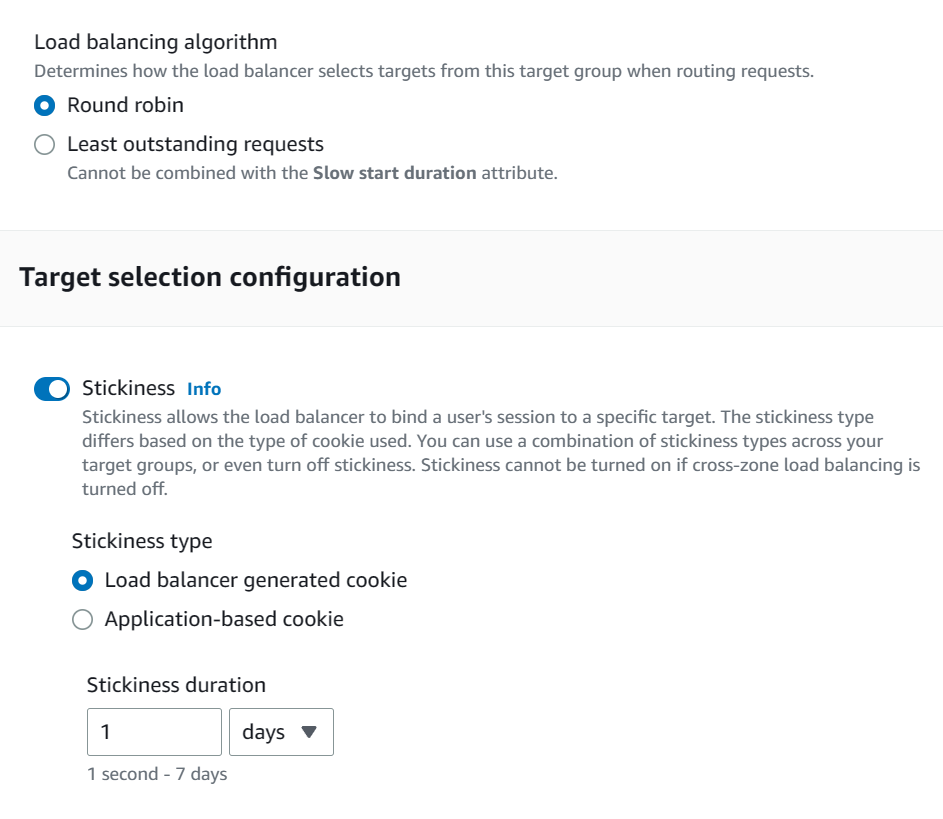
- Load balancing algorithm – Target Groups
- Round robin
- Least outstanding requests
- Sticky Sessions with ELB: EC2 instances need to keep the session info.
- Load Balancer generated cookie
- Application generated cookie
- Non-ELB Option (Recommended)
- ElastiCache or DynamoDB to find the session
Error Codes
- 502 error (Bad Gateway)
- The target host is unreachable.
- Check your security group allow traffic
- 503 error (Service Unavailable)
- There is no registered target.
- Check your target groups
- 504 error (Gateway timed out)
- The host is reachable but the applications (a web server, a database, or a lambda function) do not respond within the idle timeout period.
- Check your application is running
Types of ELB
| Type | Abbreviation | Layer | Feature |
|---|---|---|---|
| Application Load Balancer | ALB | Layer 7 (Application) | General |
| Network Load Balancer | NLB | Layer 4 (Transport) | Low latency, High Performance |
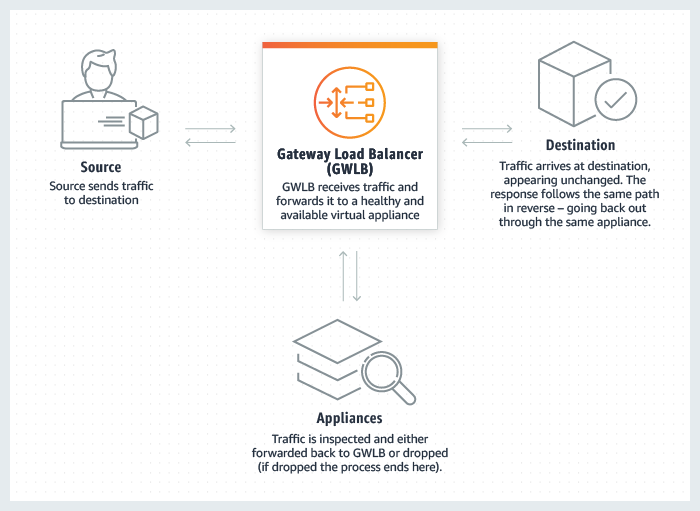
| Gateway Load Balancer | GWLB | layer 3 (Network) | Distribute traffic across multiple third-party virtual appliances |
| Classic Load Balancer | CLB | Layer 3 & 4 (TCP & SSL) + Some Layer 7 features (X-Forwarded-For header) | Legacy only |

- CLB is an old type and should be avoided. It can only be used with EC2-Classic
- No granular routing rules. All instances get routed evenly
- Good when all instances contain the same data.
- 504 error (Gateway timed out) was reported when applications do not respond.
- DNA A Record is connected to the CLB – 1 SSL Certificate per CLB.
- Offload SSL connection – HTTPS to the load balancer and HTTP to instances

- ALB operates at Layer 7 (Application): the default LB for VPCs.
- HTTP, HTTPS, WebSocket
- Supports EC2, ECS, EKS, Lambda, HTTP, HTTPS, and Web Sockets
- Can be integrated with AWS Web Application Firewall (WAF)
- Listeners
- By using rules (conditions and target groups), you can redirect requests to multiple target groups.
- Host-based: based on the host field of the HTTP header
- Path-based: based on the URL path of the HTTP header
- By using rules (conditions and target groups), you can redirect requests to multiple target groups.
- Target Groups -> Targets (Instances)
- ALB needs to be deployed into at least 2 subnets.

- NLB operates at Layer 4 (Transport)
- TCP, UDP
- Low latency, source IP address preservation (packets unchanged), best performance
- Capable of handling millions of requests per second – used for extreme performance but expensive
- Targets can be addressed using IP addresses (static IP address or Elastic IP).

- Gateway Load Balancer (GWLB) provides a gateway to distribute traffic across multiple third-party virtual appliances running in AWS.
- Works at OSI Layer 3 (Network) – IP Protocol
ALB – Listener Rules
You can specify multiple rules in ALB listeners.
- Rules are processed in order (with the default one as the last)
- Supported Actions
- Forward
- Redirect
- Fixed Response
- Conditions
- host-header, http-header
- http-request-method
- path-pattern
- source-ip
- query parameters
- Target Group Weighting
- Specify weight for each target group on a single rule
Cross-Zone Load Balancing
The nodes for a load balancer distribute requests from clients to registered targets.
- When the “cross-zone load balancing” is enabled, each load balancer node distributes traffic across the registered targets in all enabled Availability Zones.
- In ALBs, cross-zone load balancing is enabled by default.
- Other types of LBs, the setting is disabled by default.
- When the “cross-zone load balancing” is disabled, a load balancer distributes traffic only across the registered targets in each Availability Zone.
For example, you have hosted EC2 instances in two AZs. AZ-1 has 2 instances and AZ-2 has 8 instances.
- When the “cross-zone load balancing” is enabled, each of the 10 targets receives 10% of the traffic.
- When the “cross-zone load balancing” is disabled, each of the two targets in AZ-1 will receive 25% (50/2) of the traffic and each of the eight targets in AZ-2 will receive 6.25% (50/8) of the traffic.
ELB Dynamic Ports
- Classic Load Balancer must statically map port numbers on a container instance.
- The second-generation LBs (ALB and NLB) supports dynamic ports.
- A single EC2 instance can run multiple containers that use randomly assigned ports – these port numbers are not static and may change when the instance restarts.
- Dynamic ports are controlled by target groups, which track the list of ports.
- Ideal for containerized services (docker, Elastic Container Services (ECS))
Monitoring & ELB Access Logs
By default, ELB sends some basic metrics to CloudWatch.
- HealthyHostCount
- UnHealthyHostCount
- RequestCount
- TargetResponseTime
- The time elapsed, in seconds, after the request leaves the load balancer until a response from the target is received.
ELB Access Logs is an optional feature – disabled by default – that captures detailed information about requests.
- Each log contains information such as the time the request was received, the client’s IP address, latency, request paths, and server responses.
- client:port – IP address and port
- request – method, protocol, url
- request_processing_time
- response_processing_time
- chosen_cert_arn: The ARN of the certificate presented by a client
- Captures the logs are stored in the Amazon S3 bucket.
- Each access log file is automatically encrypted using SSE-S3 before it is stored in your S3 bucket and decrypted when you access it. No user action is required.
Authenticate Users with ALB
You can configure ALB to authenticate users.
- through OpenID Connect (OIDC) compliant Identity Provider (IdP)
- through the user pools supported by Amazon Cognito
- use social IdpS, such as Google, Facebook, or Amazon
- use corporate identities using SAML, Microsoft AD,or LDAP
ALB authentication with CloudFront
You need to set the following settings:
- Forward request headers: CloudFront does not cache responses for authenticated requests
- Query string forwarding and caching: the ALB has access to the query string parameters
- Cookie forwarding: CloudFront forwards all authentication cookies to the ALB
DualStack Networking
With DualStack, you can allow clients access the ELB using both IPv4 and IPv6.
- Both ALB and NLB support dualstack.
- Ensures compatibility between clients and target IP versions
- IPv4 clients connect to IPv4 targets
- IPv6 clients connect to IPv6 targets
SSL on ALB
- You can load SSL on ALB using ACM (AWS Certificate Manager).
- Users access ALB using SSL (HTTPS).
- ALB communicates with private EC2 instances using HTTP.

 Scriptorium