

Hybrid cloud architecture combines resources in the cloud with on-premise resources and use them just like all resources are in the same environment. There are a couple of ways to setup communication between AWS VPCs and on-premise networks.
AWS Managed VPN
VPN (Virtual Private Network) provides a secure connection between a VPC and on-premise networks over the existing internet connection.
- In AWS, VPN allows communication with all resources without public IP addresses and an Internet gateway.
- It is a quick and simple way to establish a secure tunneled connection to a VPC.
- VPN provides an additional level of security by encrypting traffic.
- It works as a redundant connection option besides Direct Connect (DX).
VPN Components
- On-premises:
- VPN appliance: software or hardware
- Should be accessible using a public IP
- AWS-Side:
- Virtual Private Gateway (VPG) is attached to a VPC. Only one VPG is attached to VPC.
- Customer Gateway (CGW) points to on-premise VPN appliances.
- VPN connection – Each connection uses two IPsec tunnels (parallel routes) for redundancy.


Route Propagation in Site-to-Site VPN
- Static Routing
- You can create static routes via Virtual Private Gateway (VPG) and Customer Gateway (CGW)
- Dynamic Routing
- Use Border Gateway Protocol (BPG) to share routes automatically.
- By just specifying the ASN (Autonomous System Numbers) of the CGW and the VPG, updating route tables will be done dynamically.
Best Practices
- Use dynamic VPN via BPG
AWS VPN CloudHub
VPN CloudHub is a hub that can connect multiple VPNs.
- It is low cost and easy to manage.
- It is over the public internet, but all traffic is encrypted.
Use-cases:
- If you have multiple sites in multiple VPNs, you can use AWS VPN CloudHub to connect these sites together.
- You can use CloudHub to link remote offices to access AWS resources each other.
How:
- Assign multiple Customer Gateways to Virtual Private Gateway, each with unique IP ranges.
- Each Customer Gateway must have a unique BPG ASN.

Direct Connect (DX)

DX is a physical connection between the on-premise network and AWS via customer router at a DX location or via a DX partner – 1 Gbps or 10 Gbps.
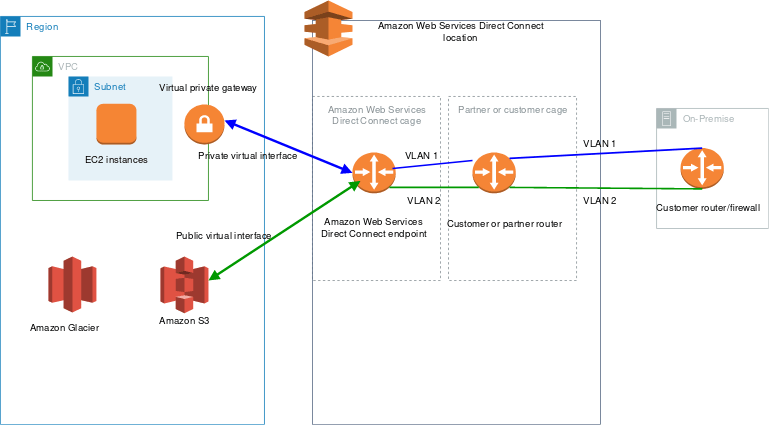
Two Types of DX
- Dedicated Connection:
- Physical connection to a single customer.
- Communication can be done through the AWS Direct Connect console, the CLI, or the API.
- Hosted Connection:
- A customer requests a hosted connectivity through the contract with AWS DX Partner, who provisions the connection.
DX Features
- Virtual Interfaces (VIFs) run on top of the DX. DX is not encrypted.
- Public VIFs can only access AWS public service endpoints.
- Private VIFs are used to connect to VPCs. It uses the internal IP addresses and cannot access public IP addresses.
- Use multiple private VIF to connect to multiple VPCs.
- It requires some time to setup. If you need quick access, DX is not an option.
- DX reduces the network cost and increases the network consistency (stable and reliable). So it is useful for high throughput workloads.
- DX is a regional service.
- The Direct Connect Gateway is used to share the DX connection among cross-region VPCs.
Steps to create a Direct Connect Connection
- Create a PUBLIC virtual interface in the DX console.
- VPC console -> VPC Connections -> Create a Customer Gateway
- Create a Virtual Private Gateway and attach it to the target VPC
VPN vs. DX
- VPN is used when
- urgent connection need, deployed fast, cheap and economical, encryption is required, flexible to change locations, highly available, short-term connection
- DX is used when
- higher throughput, consistent performance, low latency, large amount of data.
- If you need an urgent connection, you can use VPN first and then move on to the DX for better throughput.

 Scriptorium