

IAM policy is a JSON document that defines permissions for users and resources. To uniquely identify AWS resources, Amazon Resource Names (ARNs) are used.
Amazon Resources Name (ARN)
- The basic ARN format
arn:patition:service:region:account_id: + (resource-type)/resource- Examples
arn:aws:ec2:us-east-1:123456789012:instance/*
arn:aws:iam::123456789012:user/testuser (:: - region is not specified)
arn:aws:s3:::my_bucket/image1.jpg  (::: - 2 items are not specified)
Policies

- Policies need to be attached to identities or resources.
- An identity policy is attached to an identity, such as users, groups, or roles.
- A resource policy is attached to resources, such as S3 buckets or SQS queues.
{
  "Id": Optional Policy Id,
  "Version": Version of the policy language,
  "Statement": [
    {
      "Sid": optional id of a statement,
      "Effect": Allow or Deny,
      "Resource": list of resources to which actions apply,
      "Principal": user, role, or account,
      "Action": list of actions that the policy allows or denies,
      "Condition": restrict to rules
    },
    {
      ...
    }
  ]
}
- A policy document is a list of “statements” to specify permissions.
- Each statement matches a request to AWS based on:
- Action, which is an API call or an operation
- Resource, which the request targets
- Effect, which is “Allow” or “Deny”
- Principal, which receives an action – users or groups (groups cannot be used in the identity policy)
- Evaluation
- All policies are merged first (no order).
- A request is implicitly (default) denied.
- If a request is explicitly denied, it overrides anything else.
- If a request is explicitly allowed, it is allowed unless denied by an explicit deny.
{
  "Id": "Policy1603580917837",
  "Version": "2012-10-17",
  "Statement": [
    {
      "Sid": "Stmt1603580760453",
      "Action": [
        "s3:GetObject"
      ],
      "Effect": "Allow",
      "Resource": "arn:aws:s3:::mybucket/*"
    },
    {
      "Sid": "Stmt1603580916845",
      "Action": [
        "s3:PutObject"
      ],
      "Effect": "Deny",
      "Resource": "arn:aws:s3:::mybucket/*"
    }
  ]
}
- AWS-managed polices have low overhead but lacks flexibility (Administrator access, read-only access)
- Customer-managed policies are flexible but require on-going administration.
- IAM provides pre-built policy templates:
- Administrator users have full access to all AWS resources.
- Power users can access all AWS services except the management of users and groups in IAM.
- Read-only users can only view AWS resources.
IAM Conditions
| Keyword | Description |
|---|---|
| aws:SourceIp | where the API call is made from |
| aws:RequestedRegion | the region the API call is made to |
| ResourceTag/<tagname> | matching tag name |
| aws:MultiFactorAuthPresent | forcing MFA |
| aws:PrincipalOrgID | Member accounts of an AWS Organization |
{
  Effect: "Deny",
  Action: "*",
  Resource: "*",
  Condition: {
    "NotIpAddress": {
      "aws:SourceIP": ["192.0.0.1/24", "56.0.0.0/24" ]
    }
  }
}
{
  Effect: "Allow",
  Action: "ec2:*",
  Resource: "arn:aws:ec2:<region>:<account>:instance/*",
  Condition: {
    "StringEquals": {
      "ec2:ResourceTag/Env": "prod"
    }
  }
}
{
  Effect: "Deny",
  Action: "ec2:*",
  Resource: "*",
  Condition: {
    "BoolIfExists": {
      "aws:MultiFactorAuthPresent": false
    }
  }
}
Policy Simulator
You can test the effect of a policy before committing it.
https://policysim.aws.amazon.com/
Permissions Boundary
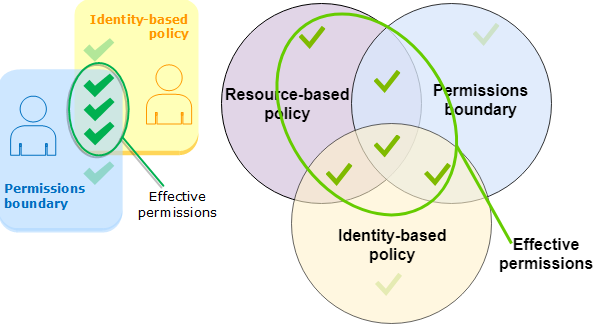
- AWS supports permissions boundaries for IAM entities (users or roles, not for groups). The boundary limits the maximum permissions for a user or a role.
- Permissions boundaries, identity policies, and resource policies
- The effective permissions are everything that is allowed by the resource-based policy and the intersection of the permissions boundary and the identity-based policy.

 Scriptorium