

Elastic File System (EFS) is a scalable managed service that implements the Network File System (NFS).
Features
- File systems can be mounted on multiple Linux instances at the same time. -> shared media, home folder, shared documents.
- It can be accessed in the VPC, across the VPC, and even from outside of VPC through Direct Connect.
- EFS is built to scale while maintaining low latency and high throughput. It can support thousands of current NFS connections.
- EFS is a regional service that stores data across multiple AZs for high availability and durability.
- EFS supports Read after Write consistency.
How to configure EFS
- Select VPC -> Create mount targets in AZs with a security group
- Security Group is used to control access NFS mount targets.
- Mount targets sit inside a subnet.
Performance Mode
- General Purpose: a default and fits for most of cases
- Max I/O: when a large number of instances need to access a file system
Throughput Mode
- Bursting throughput: linked to the size of data stored within the EFS.
- Provisioned throughput: independent of size
Storage Classes
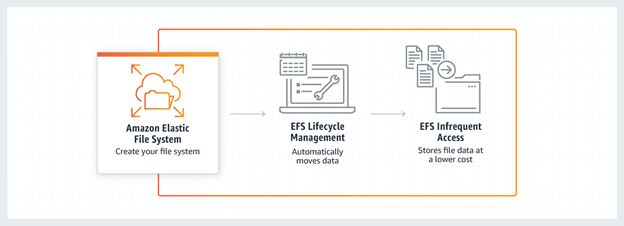
- EFS supports 2 storage Classes: Standard and Infrequent Access (IA)
- Lifecycle move files between classes.
Moving Files to EFS IA
- Create a file system
- Choose Lifecycle Management file access policy (7, 14, 30, 60, or 90 days)
- Files not accessed according to the age-off policy are moved to EFS IA
Lambda Integration: Cross-Region Mount
You can access EFS (VPC B) in the account B from the Lambda function in the account A.
- Create a Lambda function in the VPC A in the account A (111122223333).
- Create an EFS in the VPC B in the account B (444455556666).
- Set the VPC Peering between the VPC A and the VPC B.
- Update the Lambda execution roles with permission to access the VPC B and the EFS.
- Update the EFS file system policy.
- Mount & Write permissions
{
  "Statement": [
    {
      "Effect": "Allow",
      "Action": [
        "elasticfilesystem:ClientMount",
        "elasticfilesystem:ClientWrite"
      ],
      "Principal": {
        "AWS": "arn:aws:iam:111122223333:root"
      }
    }
  ]
}

 Scriptorium