

CodePipeline is a continuous delivery service. It integrates with other AWS development services such as CodeBuild, CodeCommit, and CodeDeploy.
Features
- A pipeline automate release process (build, test, deploy), ensures consistent release, and monitor the status of the process in real time.
- A pipeline is a workflow, and it is divided into stages (build stage, deployment stage …)
- Stages act as groupings of actions.
- For example, you can create a test stage with a test action that will happen before the deployment stage.
- You can enable/disable transitions between stages.
- Each stage can create artifacts, which are stored in S3 and passed to the next stage.
- Actions need artifacts as an input or an output.
- Invoke Action
- You can directly add actions to invoke a Lambda function or a Step Function state machine in a pipeline.
Stages
Structure
- Pipeline
- Stages
- Action Groups
- Actions
- Action Groups
- Stages
Common Stages
- Source (Required)
- Source Provider
- CodeCommit, S3, ECR,
- GitHub, BitBucket, GitLab
- Source Provider
- Build (Optional)
- CodeBuild
- Project name
- Build Type: Single Build or Batch Build
- Jenkins
- Provider name, Server URL, Project name
- CodeBuild
- Deploy (Optional)
- CodeDeploy, CloudFormation, Elastic Beanstalk, ECS
- Staging – Artifact is deployed and tested in the staging/test env.
- Production – Deployed to the production env.
- CodeDeploy, CloudFormation, Elastic Beanstalk, ECS
Monitoring and Troubleshooting
Use EventBridge to handle changes on Pipeline/Stage/Action state:
- ex) Events for failed pipelines or cancelled stages
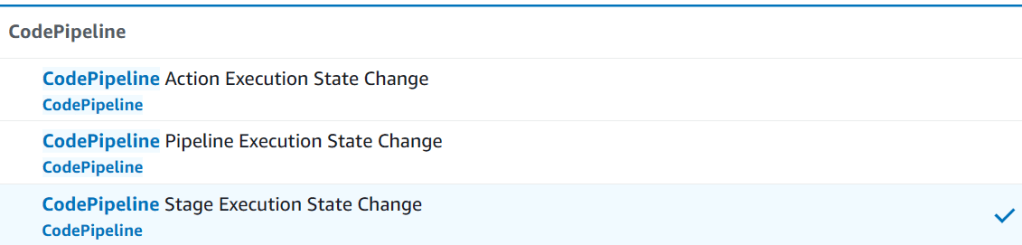
Troubleshooting:
- When a stage fails, check the console to get information
- Make sure the IAM service role has enough permission to perform actions
- Use “CloudTrail” to audit API calls
CodePipeline Manual Approvals
- You can add an approval action to an any stage in a pipeline.
- Or you can add a new stage before deployment.
- Someone with the required AWS IAM permissions can approve or reject the action.
{
  Statement: [
    {
      "Effect": "Allow",
      "Action": "codepipeline:GetPipeline*",
      "Resource": "arn:aws:codepipeline:<region>:<account>/mypipeline"
    },
    {
      "Effect": "Allow",
      "Action": "codepipeline:PutApprovalResult",
      "Resource": "arn:aws:codepipeline:<region>:<account>/mypipeline/myStage/approvalAction"
    }
  ]
}
Transitions
- Transitions are links between pipeline stages
- Transitions can be disabled or enabled (default).
- When transitions are enabled, application revisions can pass between stages.
- Disabling the transition is a preferred method to stopping movement through your pipeline as opposed to deleting the pipeline entirely.
- You can simply re-enable transitions in order to get your pipeline running again.
Multi-Region Support
- Actions can be in different regions
- For example, you can deploy a Lambda function via CloudFormation or SAM in multiple regions
- S3 artifacts stores must be defined in each region.
- CodePipeline must have read/write permission to every artifact buckets.
- For cross-region actions, CodePipeline copies the input artifacts from one Region to another.
Integration with CloudFormation
- You can deploy resources by integrating CodePipeline with CloudFormation.
- With StackSets, you can deploy resource across multiple regions and accounts.
- You can override Template parameters.
- Overriden values are provides as a JSON object as an input artifact.
- Stage Steps
- CodeCommit – save templates
- CloudFormation – Create Change Set
- Manual Approval (Optional)
- CloudFormation – Execute Change Set
Integration with Jenkins
Jenkins is a self-contained, open source automation server which can be used to automate all sorts of tasks related to building, testing, and delivering or deploying software.
Jenkins User Documentation
- Jenkins is an open-source CI/CD tool.
- With Jenkins plugins for AWS, you can replace CodeBuild, CodeDeploy, and/or CodePipeline.
- CodePipeline can trigger Jenkins Build
- Elastic IP -> Jenkins Server (EC2 Instance) -> Jenkins Build Workers with an ASG (Auto Scaling Group)
How to Trigger the Pipeline
| Type | Source | Trigger | Note |
|---|---|---|---|
| Events | CodeCommit | events via EventBridge | Recommended |
| Events | GitHub | CodeStar Source Connection | |
| Webhooks | Custom Script, GitHub | CodePipeline exposes the HTTP webhook | Legacy only |
| Polling | GitHub, CodeCommit | CodePipeline polls (checks regulary) |
# CodeCommit Event

{
  "version": "0",
  "id": "01234567-0123-0123-0123-012345678901",
  "detail-type": "CodeCommit Repository State Change",
  "source": "aws.codecommit",
  "account": "123456789012",
  "time": "2025-12-25T10:23:43Z",
  "region": "us-east-1",
  "resources": [
    "arn:aws:codecommit:us-east-1:123456789012:myRepo"
  ],
  "detail": {
    "event": "referenceCreated",
    "repositoryName": "myRepo",
    "repositoryId": "12345678-1234-5678-abcd-12345678abcd",
    "referenceType": "tag",
    "referenceName": "myTag",
    "referenceFullName": "refs/tags/myTag",
    "commitId": "3e5983EXAMPLE"
  }
}
Best Practices
- Use a single CodeDeploy application
- Do not run multiple CodeDeploy applications
- Use a single CodeDeploy application
- Create multiple Deployment Groups
- Use parallel deployment to multiple groups
- Use Parallel Actions in a Stage when possible
- You need to provide the same RunOrder
- ex) build multiple CodeBuild projects
- Use EventBridge to capture and react the CodePipeline events

 Scriptorium