

You can control S3 access in 3 ways:
- Bucket Policies apply across the bucket.
- Object Permissions apply to individual files.
- IAM (Identity) policies apply to users and groups
S3 Security
Bucket authorization is controlled on many levels as well.
- By default, the public access is disabled (private), and only a creator can access it.
- Policies will be combined in the order of
- Explicit Deny -> Explicit Allow -> Implicit Deny
Identity policies
- are attached to IAM users, roles, and groups in your account.
Bucket policies
- are the resource policies that apply to a bucket or objects.
- grant permissions to anonymous users or IAM identities in another account (cross-account access). – Principal
- are specific to S3 and cannot be used to access other services (e.g., EC2).
- make the entire bucket (e.g., S3 static website) public
- You can use the “Policy Generator“
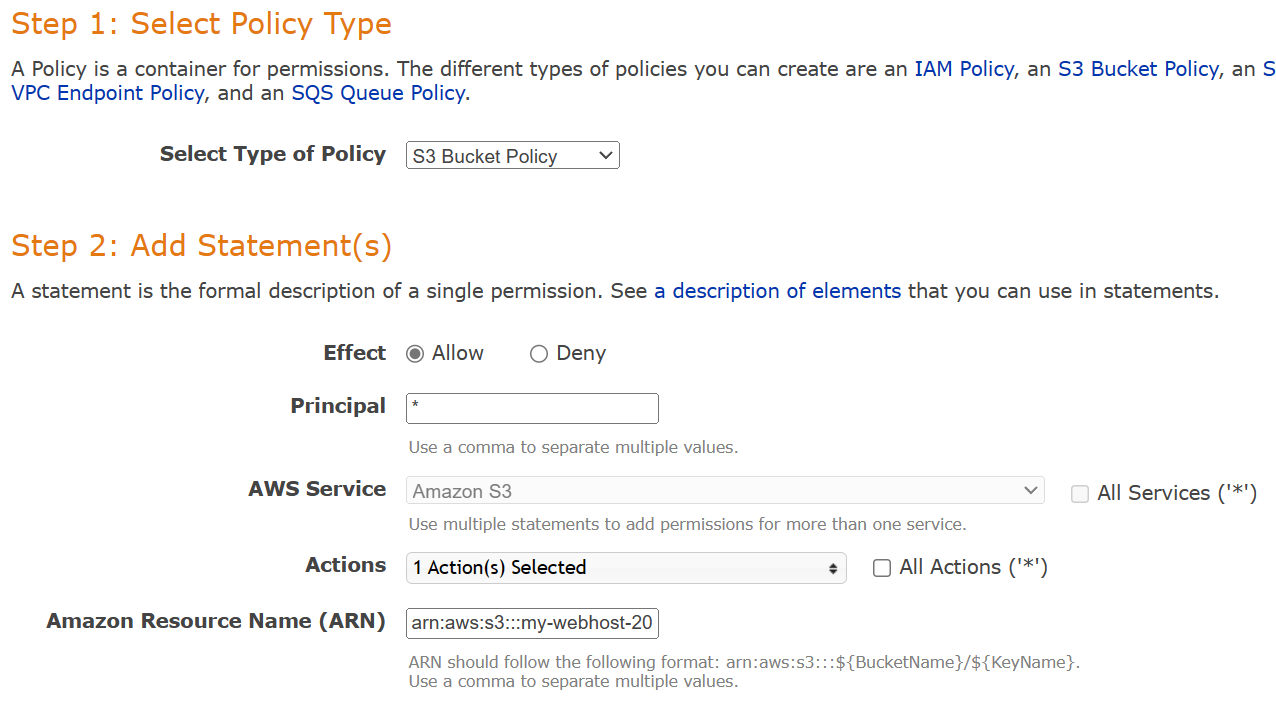
{
    "Version": "2012-10-17",
    "Statement": [
        {
            "Sid": "PublicReadGetObject",
            "Effect": "Allow",
            "Principal": "*",
            "Action": [
                "s3:GetObject"
            ],
            "Resource": [
                "arn:aws:s3:::<Bucket-Name>/*"
            ]
        }
    ]
}
ACLs (Access Control Lists)
- ACLs are applied to a bucket and an object – Not recommended anymore.
- Bucket ACL is a legacy method, used to allow public access (Everyone group)
- Bucket ACL is used to grant permission to an S3 Log Delivery group or everyone.
- Note that Object ACL can be applied to an object directly.
- Object ACL is used when an object is not owned by a bucket owner or grant public access.
- Block public access is a setting applied on top of any settings. It overrules any other public grant.
- S3 buckets can be configured to create “S3 access logs”.
- S3 access logs contain all requests made to the bucket.
S3 Cross-Account Access
There are 3 ways to share S3 bucket access across accounts:
- Using Bucket policies and IAM for the entire bucket – Programmatic access only.
- Using Bucket ACLs and IAM for individual objects – Programmatic access only.
- Using Cross-account IAM Roles – Programmatic access and Console access.
Data Encryption
Encryption in Transit
- 3S Endpoints
- HTTPS (SSL/TLS): Encrypted
- HTTP: Not encrypted
Encryption at rest (Client-side)
- The client is responsible for both the encryption/decryption and its keys.
- You can use a customer master key (CMK) stored in AWS Key Management Service (AWS KMS) or use a master key that you store within your application.
Encryption at rest (Server-side)
| Type | Abbreviation | Features | Permissions |
|---|---|---|---|
| Customer-Managed Keys | SSE-C | S3 handles the process, but the customer needs to provide the key with each PUT and GET request. | |
| S3-Managed Keys | SSE-S3 | Objects are encrypted with AES-256 by S3. Keys are stored with objects in an encrypted form. | You just need permission on the object to decrypt and access. |
| KMS-Managed Keys | SSE-KMS | Objects are encrypted using individual keys generated by KMS. | You need both S3 and KMS permissions to access objects – role separation. |
- Note that in S3 Glacier, all data is encrypted with SSE-S3 (AES-256).
Enforcing Encryption on S3 Buckets
- Objects (not Buckets) are encrypted in S3. Each put operation needs to specify an encryption type. The “Default encryption” setting in the bucket is used when a new object is uploaded. The change of the setting does not affect existing objects.
- You can specify the encryption type in the S3 PUT Request.
- The “x-amz-server-side-encryption” parameter is included in the request header:
- AES256 (S3 Managed)
- aws:kms
- You can create a bucket policy that denies any S3 PUT request that does not include the “x-amz-server-side-encryption” parameter.
{
    "Version": "2012-10-17",
    "Statement": [
    {
        "Sid": "DenyIncorrectEncryptionHeader",
        "Effect": "Deny",
        "Principal": "*",
        "Action": [
            "s3:PutObject"
 	    ],
        "Resource": [
            "arn:aws:s3:::<Bucket-Name>/*"
        ],
        "Condition": {
            "StringNotEquals": {
                "s3:x-amz-server-side-encryption": "AES256"
            }
        }
    },
    {
        "Sid": "DenyUnencryptedObjectUploads",
        "Effect": "Deny",
        "Principal": "*",
        "Action": [
            "s3:PutObject"
 	    ],
        "Resource": [
            "arn:aws:s3:::<Bucket-Name>/*"
        ],
        "Condition": {
            "Null": {
               "s3:x-amz-server-side-encryption": "true"
            }
        }
    }
    ]
}
- Enforce HTTPS: Use “aws:SecureTransport”
{
    "Version": "2012-10-17",
    "Statement": [
     {
         "Sid": "AllowHTTPSRequestOnly",
         "Effect": "Deny",
         "Principal": "*",
         "Action": [
              "s3:*"
         ],
         "Resource": [
            "arn:aws:s3:::<Bucket-Name>/*"
         ],
		 "Condition": {
		     "Bool": {
                 "aws:SecureTransport": "false"
             }
	     }
    }
    ]
}

 Scriptorium